
Group Ironman
Group Ironman lets up to 6 ironmen play together: you can trade your group, share drops and share one Group Storage, but nobody outside the group can help you. For the general ironman rules see Ironman Guide.
Group types
| Type | In short |
|---|---|
| Ranked (Group Ironman) | The normal group mode, on the group rankings. |
| Hardcore | A ranked group with shared lives. |
| Unranked | Not on the group rankings, but members can be swapped later. |
Modes only go down, never up. If you join a group with a less strict type than yours (for example a Hardcore player joining a Ranked group), you become that group's type. If a group drops to an easier type, every member drops with it.
Ironhaven Isle
Group accounts start on Ironhaven Isle, a small island for getting your group together.
- The Warden explains the modes, manages your group and opens your group panel.
- The bank by the Warden opens your Group Storage.
- Teleports don't work on the isle. You leave through the Ironhaven Portal.
- The portal opens for a whole group at once: when everyone is in, the leader steps through and takes the whole group home.
- Not ready? Use the portal alone to play solo for now. You can create or join a group later at home.
Forming a group
- Create a group with
::groupor through the Warden.
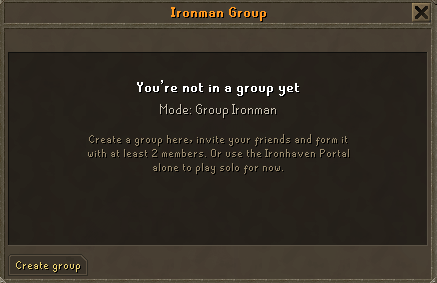
- Invite the others while you are on the isle. You can also form it alone and invite friends later at home.
- When everyone has joined, the leader steps through the Ironhaven Portal.
Limits:
- A group holds up to 6 members.
- A Ranked or Hardcore group has 6 joins in total, for good, so choose your members wisely.
- Each account can only join or form one ranked group.
- Only forming groups and Unranked groups can remove members.
Playing as a group
- Trade your own group members freely.
- Drops: you can pick up your group's drops, and your group's damage counts toward a kill's loot.
- Group chat: type
//before a message to talk to your group. - Group panel:
::groupshows your group, its members and its options.
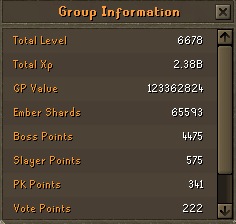
- Group stats:
::gstatsshows your group's totals (the members who are online plus the storage's coins).
- Your group shares a group collection log.
Group Storage
Open it with the Group Storage button at the top of any bank (or the bank on Ironhaven Isle).
- It has 1,000 slots, and everything in it stacks.
- One member at a time. When you open it, the others can't until you save. Press save when you are done so your group can use it again.
- Untradeable items can't go in.
- Your group can open the storage once the group is formed.
Hardcore groups
A Hardcore group shares lives: one per member, up to 6. Every time a member dies a dangerous death, the group loses a life. When the lives run out, the group becomes a normal (Ranked) Group Ironman group. The same deaths count as for a Hardcore Ironman: see Ironman Guide.
Leaving a group
- When you leave, your tradeable items go into the Group Storage. If the storage has no room for them, you can't leave yet.
- After leaving you must wait 48 hours before you join or create another group.
- Ranked and Hardcore: leaving makes you a regular Ironman, and you can't join any more groups.
- Unranked: you stay Unranked Group Ironman and can join or create another group after 48 hours.
- If the last member leaves, the group is disbanded.
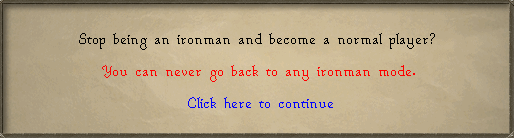
- To stop being an ironman completely, leave your group first, then use
::deiron(Ironman Guide).
Ironman clans
Clans made only of ironmen can become Ironman clans. See Clans and Clan Halls.
See also: Game Modes, Ironman Guide, Clans and Clan Halls.